
The “Redirection” module is useful for redirecting your visitors to a specific page after they successfully submit a form. If you want to give your visitors a better user experience, you can use this module to redirect them to a “Thank you” page or any other page you prefer after a successful submission.
Enabling The Redirection Extension #
In this section, we'll see how to enable the “Redirection” extension.
First, log in to your dashboard and navigate to the “HT CF7 Extension” menu. Next, visit the “Extensions” tab and click the gear icon located next to the “Redirection” extension.
Once you click the icon, a popup will appear with a few settings to configure the extension.
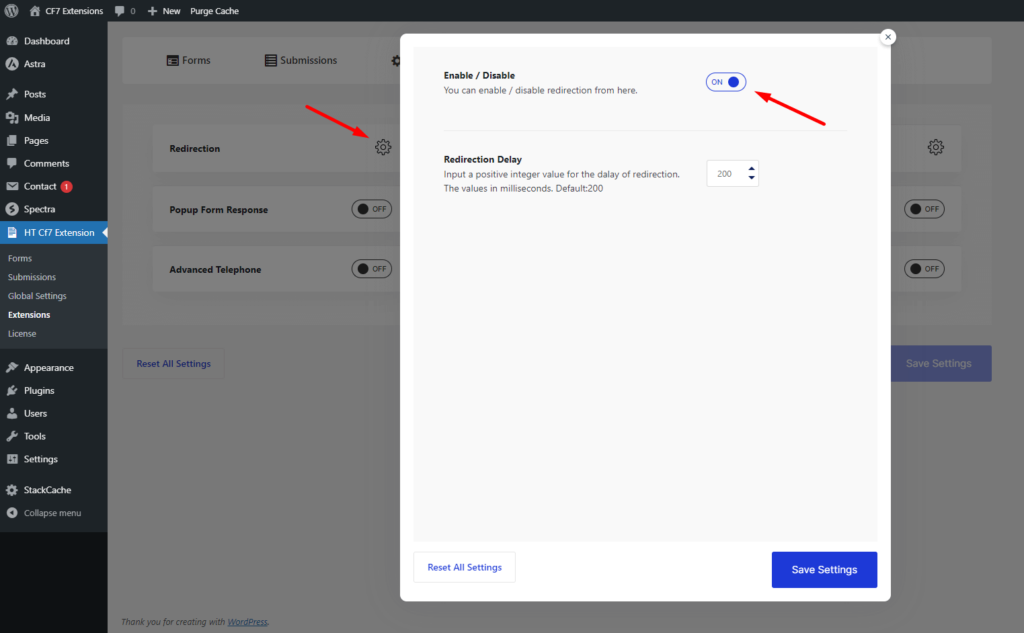
- Enable/Disable: Turn the switcher on to enable the extension.
- Redirection Delay: Once you enable the extension, you'll see another option named “Redirection Delay.” Here, you can set a time after which the redirection will start. For example, 1000 = 1sec
After configuring the extension, click “Save Settings“.
Configuring the redirection actions #
Now that you have enabled and configured the “Redirection” extension, visit the “Settings” page of the “Contact Form 7” plugin.
There, you will notice a new tab named “HT Redirect Actions“. If you open the tab, you will find some necessary settings to control the redirection.
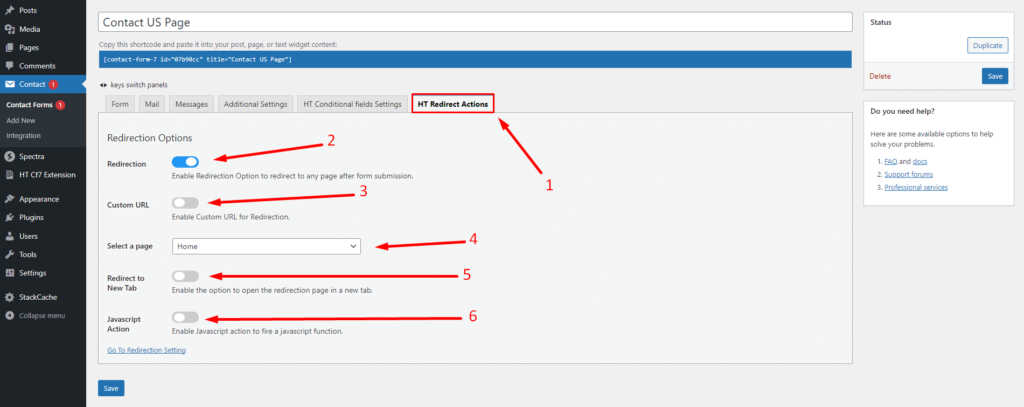
- Redirection: A switcher option to enable the redirection options.
- Custom URL: If you need to redirect your visitors to a custom URL, turn this switcher on and insert a custom URL.
- Select a Page: This dropdown option will list all of the pages of your website. You can simply select a page where you want to redirect your visitors.
- Redirect to New Tab: Enable this option if you need to open the redirection page in a new tab.
- JavaScript Actions: You can add JavaScript events here. Please note that this option doesn't require you to place the JavaScript code within a <script> tag.
Note: JavaScript Actions options for developer only.If the JavaScript action doesn't work after form submission, it means there is a problem with the code you have used.
Once you are done configuring the redirection options, please don't forget to save the changes.
After completing the setup of the Redirection Extension #
As you can see, the “Redirection” extension is redirecting us to our selected page immediately after form submission.


 OFF every WordPress plugin!