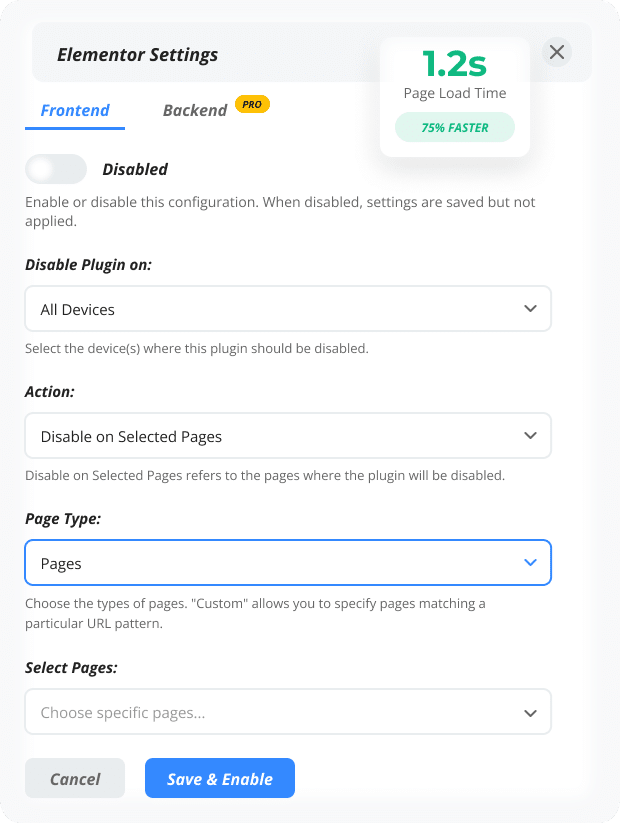
Make WordPress 75% Faster in 5 Minutes

Deactivate unused plugins per page or post to instantly reduce bloat, speed up loading, and boost your SEO scores — without touching a single line of code.

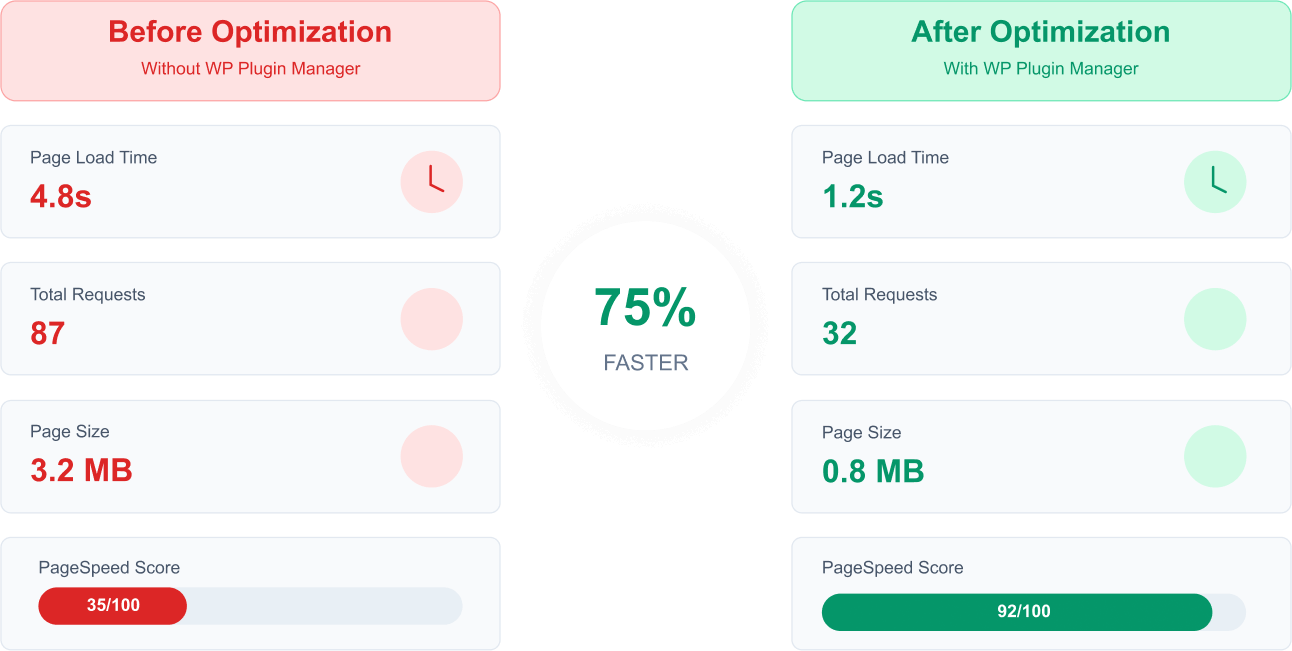
PageSpeed:
35 → 92
Before: 4.8s
After: 1.2s
Faster Load Times
0 %
Happy Users
0 K
WordPress Rating
0

The Hidden Cost of Plugin Overload

Your plugins load everywhere, destroying site performance on pages that don't need them.

Slow Loading Speed

Every active plugin adds 0.5-2 seconds to your page load time, even when not in use.

Poor SEO Rankings

Poor SEO Rankings

Google penalizes slow sites. Unnecessary plugins hurt your search visibility.

Lost Visitors

53% of users abandon sites that take over 3 seconds to load. Don't lose customers.

Intelligent Plugin Management

Load only what you need, where you need it. Simple as that.

Half-Circle Checkmark Icon

Choose Your Page

Select any page, post, or custom post type where you want to optimize plugin loading.

Half-Circle Checkmark Icon

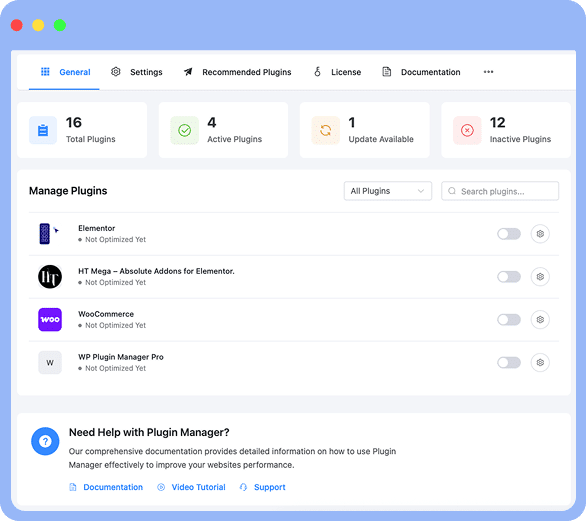
Select Plugins to Disable

Pick which plugins should be disabled on that specific page with our intuitive interface.

Half-Circle Checkmark Icon

Enjoy Instant Speed Boost

Save changes and watch your page load time drop dramatically. No coding required.

intelligent plugin management wp plugin manager

Unique & Extraordinary Features

Everything you need to optimize WordPress plugin loading for maximum performance.

Plugin On Off Switch

Plugin On/Off Switch

Enable or disable any plugin with a simple toggle switch. No complex settings needed.

Page-Specific Control

Page-Specific Control

Disable plugins on individual pages, posts, or custom post types for precise optimization.

Device-Based Loading

Device-Based Loading

Control plugin loading separately for desktop, laptop, tablet, and mobile devices.

Backend Optimization

Backend Optimization

Speed up your WordPress admin area by disabling unnecessary plugins in the dashboard.

Advanced Conditions

Set complex rules with multiple conditions for ultimate control over plugin loading.

Custom Hooks

Custom Hooks

Use WordPress hooks and screen IDs for developer-level plugin management.

Post Type Settings

Post Type Settings

Select custom post types where you want to disable specific plugins easily customization.

Admin Area Scope

Target specific admin sections like Dashboard, Media Library, or Comments for optimization.

Load Posts Adjustment

Load Posts Adjustment

Control how many posts to load and manage for better performance optimization.

Display Settings

Show plugin thumbnails and customize items per page in the management interface.

Multiple Condition Operators

Multiple Condition Operators

Use advanced operators like Contains, Not Equals, Screen ID for precise control.

Search and Filter

Search and Filter

Quickly find and filter plugins with powerful search functionality for easy management.

Plugin On Off Switch

Plugin On/Off Switch

Enable or disable any plugin with a simple toggle switch. No complex settings needed.

Page-Specific Control

Page-Specific Control

Disable plugins on individual pages, posts, or custom post types for precise optimization.

Device-Based Loading

Device-Based Loading

Control plugin loading separately for desktop, laptop, tablet, and mobile devices.

Post Type Settings

Post Type Settings

Select custom post types where you want to disable specific plugins easily customization.

Display Settings

Target specific admin sections like Dashboard, Media Library, or Comments for optimization.

Search and Filter

Search and Filter

Quickly find and filter plugins with powerful search functionality for easy management.

Backend Optimization

Backend Optimization

Speed up your WordPress admin area by disabling unnecessary plugins in the dashboard.

Advanced Conditions

Set complex rules with multiple conditions for ultimate control over plugin loading.

Custom Hooks

Custom Hooks

Use WordPress hooks and screen IDs for developer-level plugin management.

Admin Area Scope

Target specific admin sections like Dashboard, Media Library, or Comments for optimization.

Multiple Condition Operators

Multiple Condition Operators

Use advanced operators like Contains, Not Equals, Screen ID for precise control.

Enable on Selected Pages

Enable on Selected Pages

Reverse functionality to enable plugins only on specific pages instead of disabling.

The Hidden Cost of Plugin Overload

Every plugin loads everywhere, destroying your site performance

Before After Optimization Image

Advantages of using the WP Plugin Manager

Perfect for Every WordPress Site

See how different types of websites benefit from intelligent plugin management.

E-commerce Sites

E-commerce Sites

Disable heavy checkout plugins on blog posts. Load product reviews only on product pages. Speed up category pages by 60%.

Blogs & News Sites

Blogs & News Sites

Remove contact form plugins from articles. Disable gallery plugins on text-only posts. Improve reading experience dramatically.

Business Websites

Load portfolio plugins only on portfolio pages. Disable booking systems on about pages. Create lightning-fast landing pages.

Video Tutorial and Documentation

Learn how to make the most of the WordPress Plugin Manager on your website by following our step-by-step guides or video tutorials available in our documentation.

Your Competitors Are Already 3x Faster. Catch Up Today.

Every second of delay costs you visitors, rankings, and revenue. Control of your performance with WP Plugin Manager.

Advantages of using the WP Plugin Manager

Find the Perfect Plan for Your Website

Flexible WordPress plugin management solutions for all website needs.

👻 Limited-time Halloween offer

Spooky Good Deal on WP Plugin Manager

WP Plugin Manager is now Flat 40% OFF this Halloween! Easily manage and control your WordPress plugins, improve site performance, and unlock pro features at a price you’ll love. Hurry—this spooky deal ends soon!

🍬 Use code SPOOKY25 at checkout to unlock the deal.

No tricks. Only treats.

Cancel your subscription anytime before the trial ends.

  • Frequently bought together

    Complete WooCommerce Toolkit to unleash the full potential of your online store.

  • Optimize your reach: Get Google Ads account setup for targeted marketing success.

  • Enhance site insights: Setup Google Analytics 4 for advanced visitor tracking.

Why Users Love WP Plugin Manager

Easy setup, incredible results, and top recommendations!

sohan25 (@sohan25)

sohan25

(@sohan25)

This Is Good Plugin

I can hide un usefull plugin files in per page. it is best performance result for any page.

Rating
ahmad979585 (@ahmad979585)

ahmad979585

(@ahmad979585)

Works Wonderfully

Has improved my websites load time greatly .

Rating
sjnotebook.com (@simplejimbo)

sjnotebook.com

(@simplejimbo)

Excellent

It Works, saves a lot of time, and was used for a plugin that would fit the screen because of the CSS on the original theme.

Rating
den1xxx (@den1xxx)

den1xxx

(@den1xxx)

Good Support

Thank You! I got all I need. Works perfectly.

Rating
Sepi (@sepicompanywork)

Sepi

(@sepicompanywork)

Works Perfectly

works perfectly,i always use this plugin,it’s good for core web vitals

Rating
(@kylmking)

kylmking

(@kylmking)

Great Plugin, Good Support!

Thank You! I got all I need, Thanks for your help so fast !

Rating

Frequently Asked Question (FAQ)

WP Plugin Manager is a WordPress plugin management that allows website owners to selectively deactivate plugins on specific pages or posts.

Yes, WordPress Manager Plugin allows you to deactivate multiple plugins simultaneously, saving you time and effort.

Deactivating a plugin using WordPress management plugins only affects the specific page or post you choose, so your website's overall functionality remains intact.

Yes, WP Plugin Manager provides the option to reactivate a plugin on a specific page or post whenever you need it.

Yes, Plugin Manager WordPress is designed to be compatible with all WordPress plugin and themes management, ensuring seamless integration and functionality.

Yes, WP Plugin Manager can be used on multiple websites, allowing you to manage WordPress plugins effectively across all your WordPress installations.

Unfortunately, WP Plugin Manager does not have the capability to disable plugins based on user roles. It focuses on per-page and per-post deactivation.

No, WordPress deactivate plugin manager is designed to be lightweight, ensuring minimal impact on your website's performance and loading times.

Yes, WordPress plugin organizer/manager offers a user-friendly interface and intuitive options panel, making it simple to manage and configure plugin deactivation settings.

Yes, WP Plugin Manager allows you to selectively deactivate plugins for custom post types, providing flexibility and control over your website's functionality.

Yes, deactivate plugin WordPress is regularly updated to ensure compatibility with the latest version of WordPress.

Yes, WP Plugin Manager provides support for troubleshooting and customization through its dedicated support channels.

Ready to Speed Up Your WordPress Site?

Join 10,000+ smart website owners who've already optimized their plugin loading.

30-day money-back guarantee • No questions asked

WP Plugin Manager Pro

WP Plugin Manager Pro is a specialized WordPress Plugin that helps you to deactivate unnecessary WordPress Plugins page wise and boosts the speed of your WordPress site to improve the overall site performance.

WP Plugin Manager Pro
Total Downloads
0 +
Active Installation
0 +
Five Star Ratings
0 +

Unique & Extraordinary Features

WordPress Plugin Manager is a game-changer with its unique features. Selectively disable plugins on specific pages or posts, enhancing performance. The easy options panel and lightweight design simplify plugin management.

Selectively Disable Plugins

Selectively Disable Plugins

Disable Specific Pages

Disable Specific Pages

Disable Specific Posts

Disable Specific Posts

Amount of Posts Load

Amount of Posts Load

Easy Options Panel

Easy Options Panel

Very Light Weight

Very Light Weight

WP Plugin Manager Pro

Video Tutorial and Documentation

Learn how to make the most of the WordPress Plugin Manager on your website by following our step-by-step guides or video tutorials available in our documentation.

Give Plugin Manager a try!

Streamline Your Plugin Usage and Enhance User Experience with WP Plugin Manager

Advantages of using the WP Plugin Manager

Advantages-amico

Find the Perfect Plan for Your Website

Flexible WordPress plugin management solutions for all website needs.

Cancel your subscription anytime before the trial ends.

  • Frequently bought together

    Complete WooCommerce Toolkit to unleash the full potential of your online store.

  • Seamlessly integrate Google Analytics 4 with your website using HT Easy Ga4. $1 for the first month, then $59/Year. Cancel Anytime.

  • Powerful WordPress plugin to create stunning notification bars on your site. $1 for the first month, then $49/Year. Cancel Anytime.

Why Users Love WP Plugin Manager

Easy setup, incredible results, and top recommendations!

sohan25 (@sohan25)

sohan25

(@sohan25)

This Is Good Plugin

I can hide un usefull plugin files in per page. it is best performance result for any page.

Ratings
sjnotebook.com (@simplejimbo)

sjnotebook.com

(@simplejimbo)

Excellent

It Works, saves a lot of time, and was used for a plugin that would fit the screen because of the CSS on the original theme.

Ratings
Sepi (@sepicompanywork)

Sepi

(@sepicompanywork)

Works Perfectly

works perfectly,i always use this plugin,it’s good for core web vitals

Ratings
ahmad979585 (@ahmad979585)

ahmad979585

(@ahmad979585)

Works Wonderfully

Has improved my websites load time greatly .

Ratings
den1xxx (@den1xxx)

den1xxx

(@den1xxx)

Good Support

Thank You! I got all I need. Works perfectly.

Ratings
(@kylmking)

kylmking

(@kylmking)

Great Plugin, Good Support!

Thank You! I got all I need, Thanks for your help so fast !

Ratings

Frequently Asked Question (FAQ)

WP Plugin Manager is a WordPress plugin management that allows website owners to selectively deactivate plugins on specific pages or posts.

Yes, WordPress Manager Plugin allows you to deactivate multiple plugins simultaneously, saving you time and effort.

Deactivating a plugin using WordPress management plugins only affects the specific page or post you choose, so your website's overall functionality remains intact.

Yes, WP Plugin Manager provides the option to reactivate a plugin on a specific page or post whenever you need it.

Yes, Plugin Manager WordPress is designed to be compatible with all WordPress plugin and themes management, ensuring seamless integration and functionality.

Yes, WP Plugin Manager can be used on multiple websites, allowing you to manage WordPress plugins effectively across all your WordPress installations.

Unfortunately, WP Plugin Manager does not have the capability to disable plugins based on user roles. It focuses on per-page and per-post deactivation.

No, WordPress deactivate plugin manager is designed to be lightweight, ensuring minimal impact on your website's performance and loading times.

Yes, WordPress plugin organizer/manager offers a user-friendly interface and intuitive options panel, making it simple to manage and configure plugin deactivation settings.

Yes, WP Plugin Manager allows you to selectively deactivate plugins for custom post types, providing flexibility and control over your website's functionality.

Yes, deactivate plugin WordPress is regularly updated to ensure compatibility with the latest version of WordPress.

Yes, WP Plugin Manager provides support for troubleshooting and customization through its dedicated support channels.

Ready to create an amazing WordPress experience?

Try Plugin Manager Today!

Scroll to Top